Payment process
You can settle your pending orders at any point between the moment it is placed and the 45th day after having received the monthly statement that includes that order.
==Please be aware that your while orders can be placed in any of the available currencies, credit lines can only be settled in USD. Credit line orders under 20 USD will not be eligible for invoice repayment, they will need to be settled by card payment.==
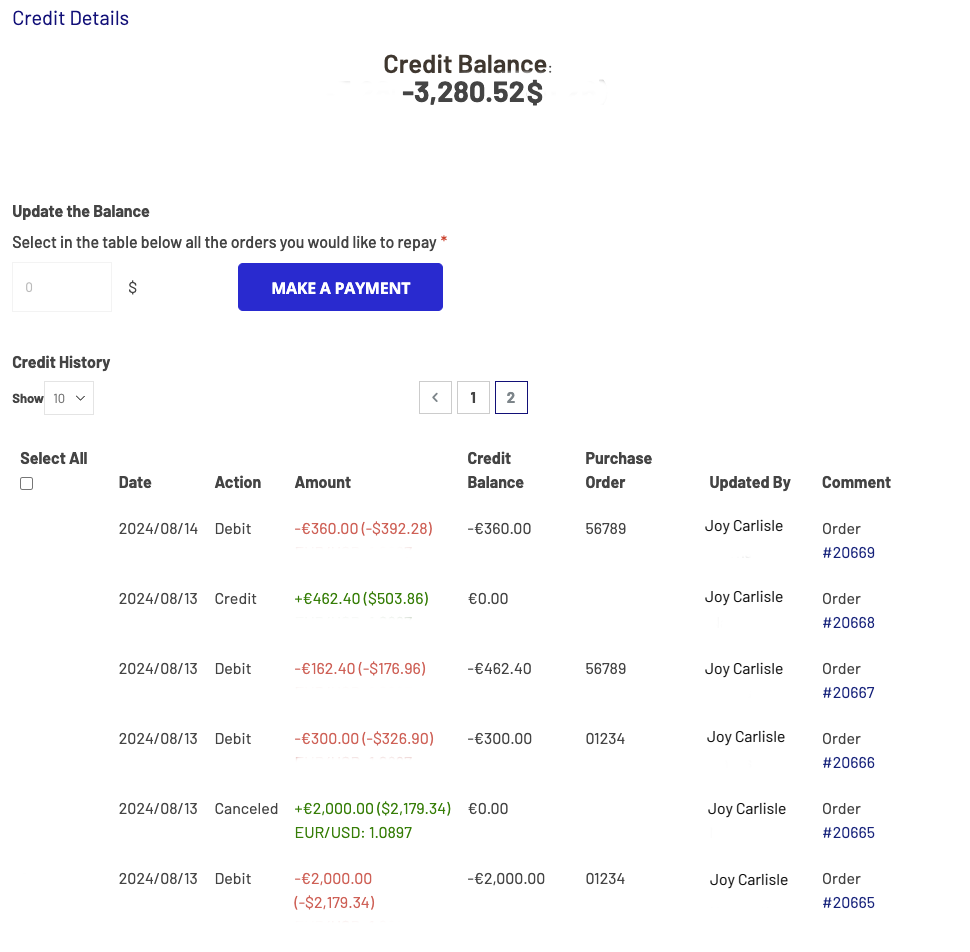
To settle your orders access the Credit Line tab of your account settings either from the monthly statement email or from the shop directly and follow these steps:
- Select all the orders you would like to settle
- Check that the consolidated amount to pay is correct
- Click on “Make a payment”
- Click on “Go to checkout”. The process from this point on is the same as a normal checkout
- Check that the billing information is correct and adjust if needed
- Click on “Next”
- Select a payment method to settle your credit: credit/debit card or invoice. In case you select invoice, you will receive the same consolidated invoice that was sent to you with the monthly statement email
- Input your information
- Click on “Place order”
As soon as the payment is made, then your credit will be settled. You can check its status by going back to the Credit Line tab of your account settings and/or checking the orders individually.
Here is a short video showing you the process:
Settling your credit line 1920x1080
Proof of payment
In the few minutes following your clicking of the “Place order” button, you will receive a payment confirmation email with the subject line “Invoice for your South Pole Carbon Asset Management Ltd. order”
The body of this email contains a summary of all the orders that were settled with that payment: billing information, chosen payment method, supported projects, order volumes in ton and order values.

Attached to this email is the invoice that serves as a receipt to confirm your order was paid.
